We've all been there: you're flying along, enjoying the view, assuming you're still in contact with ATC. But the radio has been silent for a while. Too long. You check the frequency—it looks right. But wait, did you miss a handoff ten minutes ago? Are you talking to thin air?
This is the "Silent Cockpit" problem, and we've just solved it with the TOM Indicator (Tuned Operational Match).
What is the TOM Indicator?
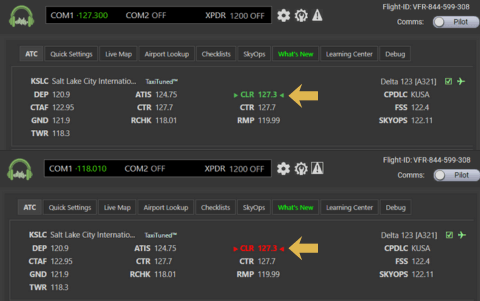
The TOM Indicator is a simple, visual status light in the SayIntentions.ai interface that tells you, in real-time, if you are tuned to the correct frequency for the controller you are supposed to be talking to.
It removes the uncertainty from online ATC. You no longer have to guess if you disconnected or if the controller is just quiet.
Understanding the Status Lights
The indicator uses a simple traffic-light system:
- Green: You are tuned to the correct frequency AND you have checked on station. System is nominal.
- Orange: You are tuned to the correct frequency, but you haven't checked in yet. (Call them!)
- Red: You are on the wrong frequency. Check your radio or look for a frequency change you might have missed.
When to Use It
TOM is effective in almost all flight phases, but it shines in specific scenarios:
- Busy Terminal Areas: When frequency changes come fast (Approach -> Tower -> Ground), a Red light instantly tells you if you fumbled the dial.
- Long Haul Flights: It acts as a "connection monitor" during long quiet periods in cruise.
- IFR Flights: Essential for maintaining the chain of control.
VFR Configuration Note
If you fly VFR without flight following (just squawking 1200 and doing your own thing), the system might show Red because it doesn't know who you intent to talk to. In this case, we recommend disabling the indicator:
Go to Pilot Portal → Settings → Misc → Toggle TOM Indicator Off.
Availability
The TOM Indicator is Live Now for all subscribers. It is enabled by default.